



Invisible AI interview assistant for Windows

The AI interview assistantonly you can see

InterviewPilot is an invisible interview assistant: it listens to your live round, reads your screen and streams answers and working code in about a second — on an overlay Zoom, Google Meet and Teams can’t capture. Built for DSA, system design, machine coding, theory and HR rounds.

User 1User 2User 3User 4

200+ offers landed with InterviewPilot

Free: 3 sessions a day, 10 minutes each · no card required · Windows 10/11 · 24-hour refund on paid plans

  • Invisible in every meeting app
  • Virtual mouse & typing
  • 15 latest AI models
  • First words in ~1 s
Invisible in every meeting app

They see your screen.Never the assistant.

Windows itself leaves the overlay out of every screen share and recording — Zoom, Google Meet, Microsoft Teams, Webex, Slack, Discord, even OBS. Your cursor and typing stay natural too: a virtual mouse the share can’t see, and code typed out key by key.

What the interviewer seesSharing
Hidden here
  • Off every screen share
  • Absent from recordings
  • Virtual cursor the share can’t see
  • Human-paced typing, never a paste
  • No taskbar or Alt-Tab entry
  • Neutral process name
Works where you interview

Every meeting app,every coding platform

No plugins, no browser extension and nothing on the interviewer's side — one desktop overlay that sits above whatever your round runs on, from a Teams call to a HackerRank test.

ZoomZoom
Google MeetGoogle Meet
Microsoft TeamsMicrosoft Teams
HackerRankHackerRank
LeetCodeLeetCode
WebexWebex
Latest models, ultra-low latency

Answers before theyfinish the question

15 of the latest models — Claude Opus 5, GPT-5.6, Gemini 3.8, Kimi K3 and more — with the fastest served on Cerebras. The first words reach your overlay in about a second, written from your resume, your brief and your own custom prompt.

  • ~1 sto the first words
  • 15 modelsClaude, GPT, Gemini & more
  • 5 languagesplus English/Hindi auto
The overlay

One window, and it's yours alone

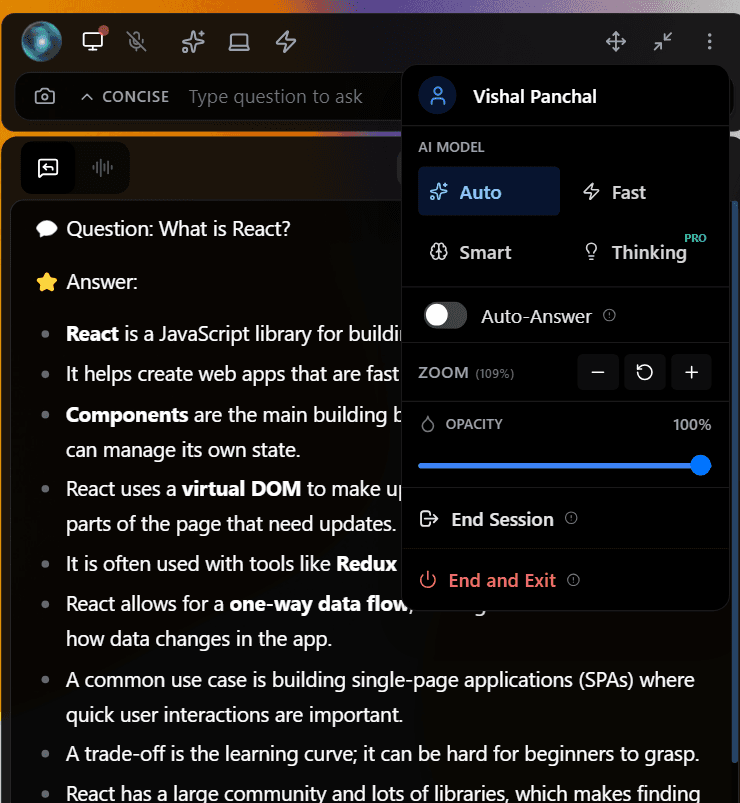
The question comes in, the answer streams out — in a window that stays on top for you and out of every screen share, recording and Alt-Tab for everyone else.

Stealth active
Live
The InterviewPilot overlay answering a live interview question in real time
  1. It hears the question

    Interviewer audio and your own mic are transcribed live, speaker-separated, so the copilot always knows what was actually asked.

  2. It writes the answer

    It reads your screen if there’s a problem on it, follows your custom prompt and resume, and streams the answer — or runnable code with the reasoning — in about a second.

  3. Nobody else sees it

    Windows leaves the overlay out of every capture, the virtual mouse keeps your real cursor still, and code is typed out key by key — the shared screen shows your editor and nothing else.

By the numbers

Engineers use InterviewPilot to clear rounds at the companies they actually want. The results speak for themselves.

200+
Offers landed
15+
AI models available
10k+
Sessions run
5.0/5
User rating
Stealth, in layers

Invisible on the call. Natural on the keyboard.

Hiding a window from the screen share is only the first layer. InterviewPilot also keeps your cursor and your typing looking like you — in every meeting app you’ll interview on.

Invisible in every meeting app

The overlay is excluded from capture by Windows itself, so it never appears in a screen share, window share or recording on Zoom, Google Meet, Microsoft Teams, Webex, Slack huddles, Discord, OBS Studio recordings. You see it on your monitor; the people on the call see your editor and nothing else.

Learn more: Invisible in every meeting app
Your screenLive
InterviewPilot

What the interviewer seesSharing
Nothing here
  • Zoom
  • Google Meet
  • Microsoft Teams
  • Webex
  • Slack · Discord · OBS

Virtual mouse

Double-tap Ctrl during a session and your real pointer stays put while a virtual cursor, invisible to screen sharing, works the overlay — scroll answers, switch chats, click buttons. Double-tap again to hand control back; it also releases itself after a minute without movement.

Learn more: Virtual mouse
Overlay · virtual mouse
Chat 1Chat 2Chat 3

CtrlCtrldouble-tap to take over · again to release

Human-paced virtual typing

Press Ctrl+Shift+V and the answer is typed into the focused editor one keystroke at a time, at a speed you choose, instead of landing as a paste. It copes with editors that auto-close brackets and quotes, so the code comes out exactly as written.

Learn more: Human-paced virtual typing
Solution.java · shared editorSharing
CtrlShiftVSpeedhuman No paste event

And everywhere else Windows could give it away

  • No taskbar, no Alt-TabNo taskbar button, no Alt-Tab entry, a neutral process name.
  • Click-through overlayAlways on top, clicks pass straight through, opacity and zoom you control.
  • Global hotkeysShow, hide, capture and answer without touching the mouse.
Every stealth layer, explained
Every round, covered

One assistant for every interview type

DSA, system design, machine coding, theory, HR and managerial rounds — each gets the kind of answer that round is actually scored on.

DSA & coding rounds

Reads the problem off your screen and returns working, explained code with complexity.

O(n) time · O(k) space · Python

InterviewPilot overlayLive

Q: Longest substring without repeating characters

  • Sliding window with a last-seen index map.
  • On a repeat, move the left edge past its previous occurrence.
def length_of_longest(s):
    seen, left, best = {}, 0, 0
    for i, ch in enumerate(s):
        if seen.get(ch, -1) >= left:
            left = seen[ch] + 1
        seen[ch] = i
        best = max(best, i - left + 1)
    return best

Preparing for a specific round? See use cases by round or read the system design cheat sheet.

The answer engine

Fast answers that sound like you

It reads what’s on your screen, follows your own rules, and writes from your resume — on the newest models, with the first words on screen in about a second.

Real-time screen analysis

Press Ctrl+Shift+S and InterviewPilot reads whatever is on screen — a LeetCode problem, a system-design prompt, a stack trace, a SQL schema — and answers it. Add several screenshots to one question for long problems. No copy-paste and no browser extension involved.

Learn more: Real-time screen analysis
leetcode.com · problem 3

3. Longest Substring Without Repeating Characters

Given a string s, find the length of the longest substring without repeating characters.

0 ≤ s.length ≤ 5·10⁴

Sliding windowHash mapO(n)

CtrlShiftSproblems, diagrams, errors, schemas

Custom prompts

Save your own prompt templates — “answer in under 60 seconds of speech”, “always mention my payments project”, “code in Java with comments” — and pick one per session or switch mid-round. A level of control that is rare among interview copilots.

Prompt template · “My style”
  • Answer in under 60 seconds of speech
  • Always mention my payments project
  • Code in Java, with brief comments
  • Sound confident, not scripted

Resume + brief grounding

Upload your resume and an extra brief — project write-ups, company research, anything you want it to know — alongside the job description. Answers are written from your real experience, in your vocabulary.

Learn more: Resume + brief grounding
  • Resume.pdf4 roles · 11 projects
  • Brief.docxProject notes · metrics
  • Job descriptionSenior backend · fintech

Latest models, ultra-low latency

Choose from 15 models across OpenAI GPT, Anthropic Claude, Google Gemini, Moonshot Kimi, Qwen, Mistral — including Claude Opus 5, Claude Sonnet 5, GPT-5.6 Terra Pro — or leave it on Auto and let InterviewPilot pick per question. The fastest run on Cerebras, so the first words reach your overlay in about a second.

  • Claude Opus 5
  • GPT-5.6 Terra Pro
  • Gemini 3.8 Flash
  • Claude Sonnet 5
  • Kimi K3
  • GPT-OSS 120B · Cerebras
  • Qwen 3.6 Plus
  • Mistral Small 4
Question endsFirst words ≈ 1 s

Multi-language audio

Live transcription in English, Hindi, Spanish, French, German, with an Auto mode that follows an interviewer switching between English and Hindi mid-sentence. Your voice and the interviewer’s are transcribed as separate streams.

  • English
  • हिन्दी
  • Español
  • Français
  • Deutsch
  • Auto · EN + HI
And a lot more

Built for the whole session, not just one answer

See all 20 features
  • Multiple chats at once

    Up to 4 parallel conversations in one session.

  • Multi-device + remote control

    Up to 3 devices on one session, kept in sync.

  • Auto-answer

    Detects when a question is asked and answers without a keypress.

  • Response styles

    Concise, Explain, STAR, talking points and more — per question.

  • Transcript + AI summary

    Full transcript and a performance summary after every round.

  • Meeting mode (beta)

    Notes, nudges when you’re asked, and follow-ups for work calls.

  • Chrome companion extension

    Alt+Shift+C sends selected page text straight to InterviewPilot.

  • Global hotkeys

    Show, hide, capture and answer without touching the mouse.

Three steps

Set up once, use it every round

No browser extension, nothing on the interviewer’s side, and nothing to reconfigure between rounds.

  1. 1

    Install and personalise

    Install the Windows app, sign in, and add your resume, the job description and any extra brief. Optionally write a custom prompt for how answers should sound.

    Windows 10/11 · two minutes, once
  2. 2

    Start the session

    Pick the interview type, language and model, then start. The overlay is invisible to screen share from the first second — in Zoom, Meet, Teams or anything else.

    15 models · 5 languages · auto-answer
  3. 3

    Answer with backup

    Speak normally. Answers stream in about a second; press Ctrl+Shift+S to read a problem off your screen, and drive it all with the virtual mouse and hotkeys.

    Transcript + AI summary afterwards
From the field

Engineers who landed the offer

Feedback from candidates who used InterviewPilot in real technical and behavioural rounds.

InterviewPilot was a game-changer for my Google India interview. The real-time system design suggestions were incredibly accurate and helped me structure my thoughts perfectly.
Aditya SrivastavaAditya SrivastavaSDE-2 @ Google India
The STAR-format behavioural answers felt genuinely mine. It turned messy project experience into clear, impactful stories for Amazon.
Rahul DeshmukhRahul DeshmukhSenior Software Engineer @ Amazon
Stealth mode is brilliant. I was nervous about screen sharing, but it stayed completely hidden. It is like having a coach sitting next to you.
Priya SharmaPriya SharmaFrontend Developer @ Zomato
It read my coding logic and offered the next step during the live round. It genuinely felt like pair programming with a senior engineer.
Vikram MalhotraVikram MalhotraStaff Engineer @ Uber India
I used it for my Microsoft PM loop. The way it synthesised my career history into product case answers was outstanding.
Ananya IyerAnanya IyerProduct Manager @ Microsoft
I used it for my Microsoft PM loop. The way it synthesised my career history into product case answers was outstanding.
Ananya IyerAnanya IyerProduct Manager @ Microsoft
Finally a tool that understands Indian tech market context. The suggestions were spot on for every startup I interviewed with.
Siddharth VarmaSiddharth VarmaFull Stack Developer @ Swiggy
Helped me crack the data science interview at Netflix India. It handled deep-learning follow-ups like a domain expert.
Megha GuptaMegha GuptaData Scientist @ Netflix India
Setup took under two minutes and I was practising immediately. The most efficient prep tool I have used.
Arjun ReddyArjun ReddyBackend Engineer @ Razorpay
It gave me the confidence I needed after a long career break. I secured three offers within a month.
Ishita KapoorIshita KapoorQA Engineer @ Atlassian
Pricing

Pay per session, or go unlimited

Buy credits for one-off rounds, or run unlimited sessions while your job search is active. Every plan includes the full stealth overlay.

Starter

One full session for your next interview round.

₹499₹599/ 1 session
Save ₹100
Get Starter
  • 1 interview session (1 hour)
  • No daily limit or waiting time
  • All standard AI models
  • Credit never expires

Interview Pack

Three sessions to cover a full interview loop.

₹1,299₹1,999/ 3 sessions
35% off₹433 / session
Get Interview Pack
  • 3 interview sessions (1 hour each)
  • No daily limit or waiting time
  • All standard AI models
  • Credits never expire

Job Hunt Pack

Best value

Ten sessions for an active job search, at the lowest price per session.

₹4,999/ 10 sessions
₹500 / session
Get Job Hunt Pack
  • 10 interview sessions (1 hour each)
  • No daily limit or waiting time
  • All standard AI models
  • Credits never expire
Questions

Frequently asked questions

Everything worth knowing before your next round.

Still have a question?[email protected]

Yes. The overlay is excluded from capture by Windows itself, so it is absent from screen shares and recordings in Zoom, Microsoft Teams, Google Meet, Webex, Slack, Discord and OBS — including when you share your entire desktop. It also has no taskbar button or Alt-Tab entry.

Double-tap Ctrl during a session and a virtual cursor — invisible to screen sharing — drives the overlay while your real pointer stays still. Virtual typing (Ctrl+Shift+V) types an answer into your editor key by key at a speed you choose, so it arrives as ordinary typing rather than a sudden paste.

DSA and coding rounds, system design (HLD), machine coding and LLD, theory and CS fundamentals, HR, behavioural and managerial rounds, plus SQL, debugging and frontend interviews. Coding rounds get working code with complexity; behavioural rounds get STAR answers from your resume.

Yes. Press Ctrl+Shift+S and InterviewPilot reads what is on screen — a LeetCode or HackerRank problem, a system-design prompt, an error message — and answers it. You can attach several screenshots to one question. No copy-paste or browser extension is needed.

Answers stream token by token, and the first words usually reach the overlay in about a second. You can choose from 15 of the latest models — including Claude Opus 5, Claude Sonnet 5, GPT-5.6 and Gemini 3.8 — or leave it on Auto.

Yes, in two ways. Upload your resume, the job description and an extra brief so answers are written from your real experience. Then write custom prompts — your own rules for tone, length, format and what to always mention — and switch between them per session or mid-round.

Live transcription works in English, Hindi, Spanish, French and German, with an Auto mode that follows an interviewer switching between English and Hindi. Code answers cover every mainstream programming language, including Python, Java, C++, JavaScript, TypeScript, Go and Rust.

Yes. One live session can be open on up to three devices — for example your laptop plus your phone. Questions asked on one appear on all of them, and Remote Scroll keeps every screen on the same answer. You can also run up to four chats in parallel inside one session.

The free plan gives 3 sessions a day, 10 minutes each, with no card required and the same stealth overlay as paid plans. Every paid plan has a 24-hour money-back guarantee.

Your next round

Stop rehearsing alone. Bring backup in.

Install InterviewPilot, add your resume, and walk into your next round with answers and working code in about a second — on your screen, and in no meeting app’s screen share.

  • Free plan: 3 sessions a day
  • No card required
  • 24-hour money-back guarantee